Downloading results
Simulation results can be downloaded using the rana_panel. To download results:
Active the Rana panel by clicking the pictogram (
 ) in the toolbar.
Browse to the project and files to the result that you like to download
You have two options: #) Double click the result. That will open the detail page. On the bottom of the page is a button ‘Download results’. #) Right mouse click on the result. This opens a context menu also showing the option ‘Download results’.
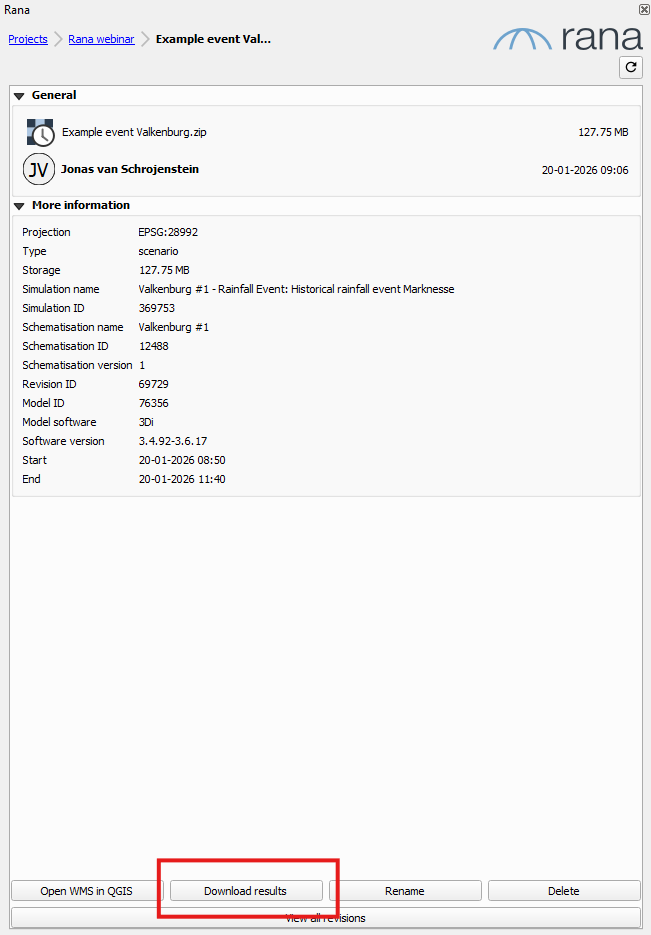
The results will be downloaded to your simulations working directory, so that you can find them easily when loading them via the Rana Results Manager
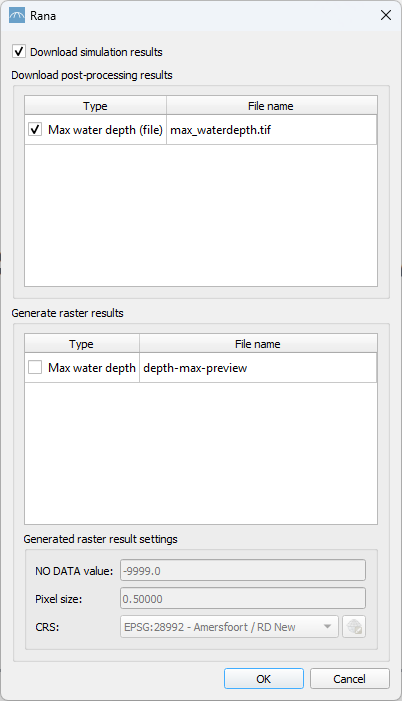
The files that are downloaded in this way are the Raw results. Rana also provides postprocessed results, such as maximum water depth rasters. These are available in the detail window when downloading. After the download is complete you will be asked if you like to open the results with the Results Manager
In most cases a maximum water depth file is readily available as a .tif file. In case it is not available it is possible to generate this raster in the below panel using the ‘Generate raster results’
Note
Generating raster results means that the raster being generated using the raw data available on the Rana servers. Generating them might take a while depending on the raster size.