Accounts and user management
Powerful hydrological analysis starts with the data you use — and Rana makes it easy to get started with your existing datasets and workflows. This guide will help you set up your account, explore key features, and start using Rana for your projects.
Setting up your account
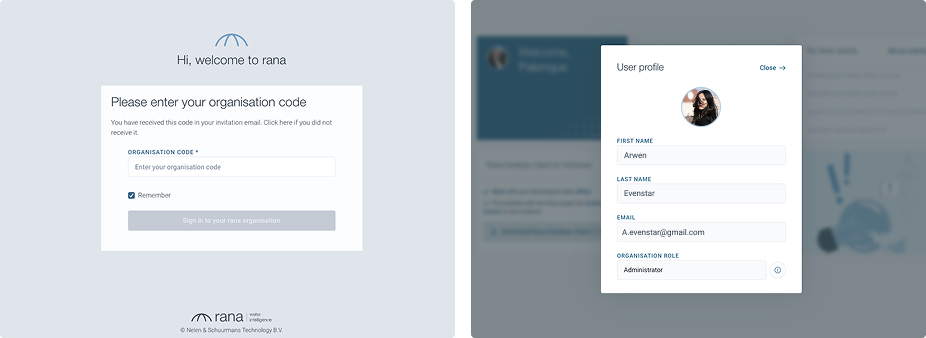
Sign in to your account:
link: https://www.ranawaterintelligence.com/login
If your organisation is already using Rana, request an invitation from your administrator.
Configure your profile:
Click on your profile icon in the bottom-left corner.
Make sure your name and e-mail are set correctly.
Here you can also add a profile picture.
Configure your profile settings for receiving notifications from Rana.
User roles
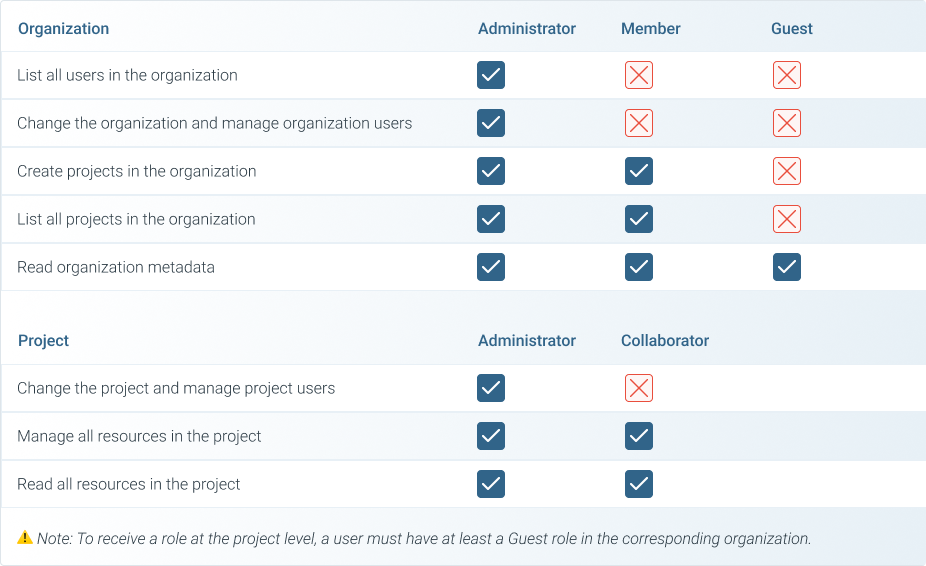
Rana uses a two-level role system to manage access and permissions:
Organisation Level: Governs access within a organisation (or department).
Administrator: Full access within the organisation, including creating projects and managing users.
Member: Can work on projects and list organisation resources but cannot manage users.
Guest: Can only read organisation-level information.
Project Level: Manages access to individual projects within a organisation.
Administrator: Full access to project settings, users, and data.
Collaborator: Can contribute to the project but cannot manage settings or users.